
E-commerce Email Marketing: The 8-Flow Framework That Drives 30% of DTC Revenue
Email is the only digital channel where direct-to-consumer brands routinely earn 25 to 40 percent …


 ★★★★★ 5.0 · 100+ reviews








Table of Contents
MEET OUR TEAM!
You open your ad dashboard one morning and ROAS has fallen from 4 to under 1 in a single quarter. The creative is the same. The audience is the same. The budget is the same. Nothing in your actual marketing changed, yet the numbers say the campaigns collapsed. Before you rebuild everything in a panic, consider a quieter explanation: your campaigns may be performing fine, and your measurement is what broke. This is the exact scenario that pushes e-commerce teams toward server-side tracking, and on Shopify it has moved from an advanced nice-to-have to a baseline requirement.
The cause is signal loss. Browser-based (client-side) tracking depends on cookies and JavaScript that fire in the visitor’s browser, and that environment has become hostile to tracking. Safari’s Intelligent Tracking Prevention caps cookie lifetimes, ad blockers strip tracking scripts before they run, iOS privacy changes limit what can be measured, and browsers are phasing out third-party cookies. Every one of these blocks a slice of your conversion data. The sale still happens; your analytics and ad platforms just never hear about it. The result is under-reported conversions, misattributed revenue, and optimization algorithms making decisions on incomplete data.
Server-side tracking is the fix, and this is a step-by-step implementation guide for setting it up on Shopify with GA4. It covers what server-side tracking is and why it recovers lost data, the architecture you are building, a full setup walkthrough, how to validate that it works, the mistakes that cause silent failures, and how to measure the recovery. By the end you will have a working implementation plan rather than just an understanding of the concept.
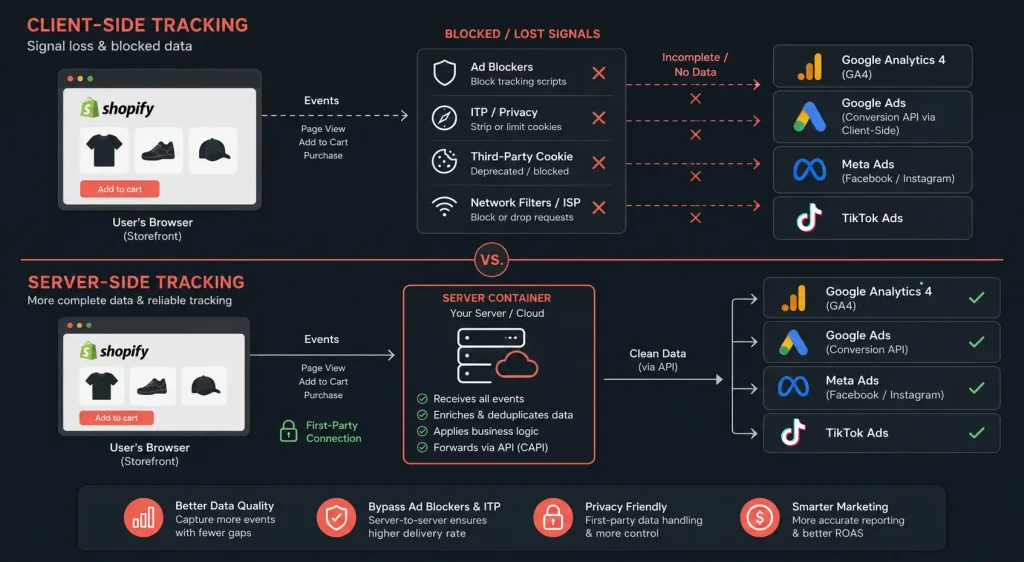
Server-side tracking is a method of collecting and sending analytics and conversion data from your own server rather than from the visitor’s browser. Instead of the browser sending event data directly to GA4, ad platforms, and other tools, the browser sends the event to a server you control, and that server forwards clean, complete data to each destination. The collection point moves from an environment you do not control (the visitor’s browser) to one you do (your server container).
The reason this recovers lost data is straightforward. Ad blockers and browser privacy features work by blocking or restricting requests made from the browser to known tracking domains. When the tracking request comes from your own server instead, it is not subject to the same browser-level blocking. Cookies set by your server (first-party context) survive longer than third-party cookies. The data path is more resilient because it routes around the exact mechanisms that were causing the loss.
This is not a loophole or a workaround that violates privacy rules. Server-side tracking done correctly still respects user consent, still honors opt-outs, and still complies with privacy regulations such as GDPR. What it does is stop losing data from users who have consented to tracking but whose data was being blocked by blunt browser-level mechanisms that cannot tell the difference between consented and non-consented tracking. Consent management remains mandatory; server-side tracking changes the data path, not the legal basis.
The relationship to attribution is direct. Incomplete conversion data is the root cause of most attribution problems, and the same measurement discipline that governs app marketing attribution applies on the web: you cannot optimize toward conversions your system never recorded. Server-side tracking is the web-side foundation that makes accurate attribution possible in the first place.
To implement server-side tracking, it helps to see clearly what changes in the data flow.
Client-side tracking is the traditional model. The visitor’s browser loads JavaScript tags (the GA4 tag, the Meta pixel, the Google Ads tag), and each tag sends event data directly from the browser to its destination platform. Every request originates in the browser, which means every request is exposed to ad blockers, cookie restrictions, and privacy features. When any of these intervene, the data is lost before it leaves the browser.
Server-side tracking inserts a server container between the browser and the destinations. The browser sends events to your server container (running on your own subdomain, in first-party context), and the container processes and forwards the data to GA4, ad platforms, and other tools. The browser still initiates the event, but the heavy lifting and the platform-bound requests happen server-side, out of reach of browser-level blocking.
The comparison below makes the practical differences concrete.
| Factor | Client-Side (Browser) | Server-Side (Container) |
|---|---|---|
| Data origin | Visitor’s browser | Your server container |
| Ad-blocker exposure | High, blocked before firing | Low, routes around blocking |
| Cookie lifetime | Capped by ITP (often 7 days) | Extended, first-party context |
| Data control | Sent raw to each platform | Filtered, enriched before sending |
| Page speed impact | Multiple browser-side tags | Fewer browser tags, lighter load |
| Setup complexity | Low, paste tags and go | Higher, needs server container |
The trade-off is clear from the table: server-side tracking recovers data, extends cookie life, improves page speed, and gives you control over the data before it reaches each platform, at the cost of a more involved setup. For a Shopify store spending meaningfully on paid media, that trade is almost always worth making, because the data recovered directly improves the decisions the ad platforms make on your behalf.
Peaker Note: The ROAS Did Not Drop, the Reporting Did
The most common measurement emergency Digipeak sees on Shopify stores is the phantom ROAS collapse: reported return on ad spend falls sharply over a quarter while actual sales, checked against the Shopify admin, barely moved.
Server-side tracking on Shopify requires a few pieces in place before implementation. Confirm these first to avoid stalling mid-setup.
The single most important prerequisite is the first-party subdomain. Running the server container on a subdomain of your actual store domain is what puts it in first-party context, which is where most of the cookie-lifetime and blocking-resistance benefit comes from. A container running on a generic third-party domain recovers far less data, which is one of the most common reasons a server-side setup underdelivers.
The implementation runs through six stages. Each builds on the last, so the order matters.
Create a server-side tag management container and deploy it to a hosting environment. The container is the server component that will receive events from the browser and forward them to GA4 and your ad platforms. During setup you will get a container configuration and a server URL. This URL is the endpoint your store will send events to, and it should live on your tagging subdomain rather than a generic provided domain.
The hosting decision matters for cost and reliability. A properly provisioned server-side container needs enough capacity to handle your event volume without dropping requests during traffic spikes such as sales events. Underprovisioned containers silently drop data during exactly the high-traffic moments when accurate measurement matters most.
Point your tagging subdomain to the server container so the container runs in first-party context. This step is what unlocks the extended cookie lifetimes and blocking resistance that justify the whole project. Confirm the subdomain resolves correctly and serves the container before moving on, because everything downstream depends on it.
Shopify exposes customer events (through its customer-events or web-pixel layer) that fire when visitors view products, add to cart, begin checkout, and purchase. Configure these events to send to your server container’s endpoint rather than, or in addition to, sending directly to platforms from the browser. The purchase event on the checkout and order-status pages is the highest-value event to capture correctly, because it is the one that feeds conversion optimization and revenue reporting.
For stores with full checkout access, capturing the server-side purchase event directly from the order data is the most reliable configuration, because it does not depend on the browser firing a tag on the thank-you page at all. This is where server-side tracking is most resilient: the conversion is recorded from the order itself, not from a fragile browser event that an ad blocker or a fast page-exit can prevent.
Take Advantage of Automation with Artificial Intelligence!
How can you use your time more efficiently? Artificial intelligence saves you time by automating repetitive tasks. Learn how you can leverage AI to accelerate your business processes.
Inside the server container, set up the GA4 configuration that receives the incoming events and forwards them to your GA4 property. Map each incoming event to the correct GA4 e-commerce event and ensure the e-commerce parameters (item IDs, values, currency, transaction IDs) are passed through correctly. The transaction ID is critical: it is what lets GA4 deduplicate purchases so a single order is not counted twice when both client-side and server-side tracking are running during a transition period.
Your Visuals Stand Out But You're Not Getting Any Feedback?
Get a Free Design Audit Now!
Let's evaluate together how you can better engage with your target audience visually, dysfunctional designs, and tips to increase engagement. Fill out the form now and get your free analysis report!
Beyond GA4, configure the server container to send conversions to your ad platforms through their server-side conversion interfaces (commonly called Conversions API integrations). This is where the paid-media ROAS recovery actually happens: sending conversions server-side to the ad platforms gives them the complete conversion data their optimization algorithms need. Match the event data and include the available match parameters so the platform can attribute conversions accurately while respecting privacy rules.
Deduplication matters here too. If you run both the browser pixel and the server-side conversion feed during the transition, each event needs a shared event ID so the platform recognizes them as the same conversion and does not double-count. Getting deduplication wrong produces inflated conversion counts that are as misleading as the under-counting you were trying to fix.
Wire your consent management into the server-side flow so that events only fire, and data only forwards, in line with the visitor’s consent choices. Server-side tracking does not exempt you from GDPR or other privacy regulations. Consent mode signals should pass through to the server container and govern what it does with each event. A server-side setup that ignores consent is a compliance liability, not a measurement win.
Once all six steps are in place, you have a working server-side tracking pipeline: Shopify events flow to your first-party server container, which forwards consented, deduplicated, complete data to GA4 and your ad platforms. The next question is whether it is actually working, which is where validation comes in.
Peaker Note: The Reconciliation Habit
The single most useful habit for anyone running measurement on Shopify is monthly reconciliation against the Shopify admin. Pull GA4 purchases and revenue, pull ad-platform reported conversions, and compare all of them against the actual orders…
A server-side setup can look complete and still leak data silently. Validation is not optional; it is how you confirm the implementation is doing what it was built to do.
Check event flow in real time. Use the server container’s preview and debug mode to watch events arrive from the browser and forward to destinations. Trigger a test purchase and confirm the full sequence (view, add to cart, checkout, purchase) arrives at the container and forwards to GA4 and the ad platforms with correct parameters.
Reconcile against Shopify’s own numbers. Shopify’s admin is the source of truth for orders and revenue. Compare GA4 purchase counts and revenue against the Shopify admin over the same window. Before server-side tracking, GA4 typically under-reports; after a correct implementation, the gap should narrow substantially. A persistent large gap signals a configuration problem worth investigating.
Verify deduplication. If both client-side and server-side are running, confirm that purchases are not being double-counted. GA4 transaction IDs and platform event IDs should be deduplicating correctly. Reported conversions that suddenly exceed actual orders are the tell-tale sign of a deduplication failure.
Confirm consent is respected. Test with consent granted and consent denied, and verify the server container behaves correctly in both cases. Data flowing when consent was denied is a compliance failure that has to be fixed before the setup goes fully live.
Validation is not a one-time step. Tracking breaks quietly when Shopify updates its checkout, when a platform changes its API, or when a theme change alters event firing. A quarterly validation check catches these silent breakages before they cost a quarter of misreported data.
Across Shopify tracking implementations Digipeak has audited and rebuilt, the same failure patterns recur. Each one produces data that looks plausible while being quietly wrong, which is more dangerous than an obvious break. The connection to conversion rate optimization is direct: you cannot optimize a funnel you are measuring incorrectly.
Server-side tracking is a method of collecting analytics and conversion data from your own server rather than from the visitor’s browser. Instead of the browser sending data directly to GA4 and ad platforms (where ad blockers and privacy features can block it), the browser sends the event to a server you control, which forwards complete data to each destination. It recovers conversion data that browser-based tracking loses, which improves reporting accuracy and the performance of ad-platform optimization.
A ROAS drop with steady actual sales is usually a measurement problem, not a performance problem. Browser-based tracking loses conversion data to ad blockers, cookie restrictions, and privacy features, so ad platforms are credited with fewer conversions than actually happened and report lower ROAS. The platform then throttles spend on campaigns that are still profitable. Server-side tracking restores the conversion signal, which typically brings reported ROAS back toward the true figure. Always reconcile against your Shopify admin to see whether the drop is real or a reporting artifact.
Yes. GA4 is designed to work with server-side tracking through a server-side container that receives events and forwards them to your GA4 property. The setup maps your e-commerce events (view_item, add_to_cart, begin_checkout, purchase) to GA4 and passes through the e-commerce parameters and transaction IDs. Server-side GA4 tracking typically recovers a meaningful share of the conversions that client-side GA4 was losing to browser-level blocking.
Yes, when implemented correctly. Server-side tracking changes the data path, not the legal basis for processing. You still need to collect and honor user consent, and the server container must respect consent signals exactly as client-side tracking would. What server-side tracking does is stop losing data from users who did consent but whose data was being blocked by blunt browser mechanisms. A server-side setup that ignores consent is not compliant, so consent management remains mandatory.
It depends on ad spend more than store size. If you spend meaningfully on paid media and rely on ROAS to make budget decisions, signal loss is costing you accuracy regardless of store size, and server-side tracking is worth the setup. If you run little or no paid media and use analytics only for directional insight, the added complexity may not be justified yet. The tipping point is usually when inaccurate conversion data starts causing real budget decisions to be made on wrong numbers.
The recovery varies by audience, browser mix, and how much of your traffic uses ad blockers or privacy-focused browsers. Stores with audiences skewed toward privacy-conscious users and Safari tend to see larger recovery because those environments block more client-side tracking. The honest answer is that recovery is meaningful but store-specific, which is why reconciling GA4 against the Shopify admin before and after implementation is the only reliable way to measure your own recovery rather than relying on a generic figure.
A technically comfortable store owner can set up a basic server-side implementation, but the parts that most affect results (first-party subdomain configuration, deduplication, Conversions API setup, and consent integration) are where self-implementations most often go wrong in ways that are hard to detect. The setup can look complete while leaking data silently. If paid media budget is significant, a validated professional implementation usually pays for itself through the recovered signal and the better ad-platform decisions that follow.
The shift every Shopify store running paid media needs to internalize is that measurement is no longer free or automatic. Browser-based tracking, which worked for a decade, has been quietly dismantled by privacy features, ad blockers, and the end of third-party cookies. Server-side tracking is the response: it moves data collection to a first-party server you control, routes around the blocking, and restores the conversion signal that client-side tracking loses. For a store making budget decisions on ROAS, that recovered signal is the difference between optimizing on truth and optimizing on a shrinking, distorted sample.
The three takeaways for teams approaching this: run the container in first-party context on your own subdomain (this is where most of the benefit comes from, and skipping it is the most common way implementations underdeliver), get deduplication and consent right before going live (both can turn a measurement win into a new problem), and reconcile against the Shopify admin continuously (it is the only source of truth, and the reconciliation habit is what catches silent failures before they cost a quarter of data).
The forward-looking reality is that this trend only deepens. Third-party cookies are ending, privacy regulation is tightening, and browser-level restrictions continue to expand. The stores that build server-side measurement now are building the durable foundation that the next round of privacy changes will make even more valuable, while the stores still relying entirely on client-side tracking will watch their reported performance drift further from reality with each browser update.
At Digipeak, server-side tracking is treated as measurement infrastructure that underpins every paid-media and e-commerce growth decision a store makes. Engagements open with a tracking audit that reconciles GA4 and ad-platform reported conversions against the Shopify admin, quantifying exactly how much conversion data the store is currently losing before any implementation begins. The audit turns an abstract problem into a concrete number, which is usually what makes the case for the work.
The implementation follows the six-step sequence in this guide: first-party container setup, subdomain configuration, Shopify customer-events connection, GA4 server-side configuration, ad-platform Conversions API integration, and consent-compliant data flow. Deduplication and consent are built in from the start rather than retrofitted, because both are where self-managed implementations most often fail silently. The setup is then validated against the Shopify admin so the recovery is measured, not assumed.
Digipeak operates as a 360-degree growth agency from offices in London, Istanbul, and Texas, holds Google and Meta Partner status, and manages measurement infrastructure alongside the paid media, SEO, and CRO workstreams that depend on accurate data. The Partner status gives the team early visibility into platform measurement changes (Conversions API updates, consent mode evolutions) so implementations stay current as the privacy landscape shifts.
If your reported ROAS has drifted away from what your Shopify admin says about actual sales, that gap is measurable, and quantifying it is where the conversation should start before any rebuild.

Join the
Digipeak Newsletter!
Stay up to date with the latest digital marketing insights, trends, and updates. Subscribe today!
Related Articles
Email is the only digital channel where direct-to-consumer brands routinely earn 25 to 40 percent …

About the Author: Digipeak is a 360° Digital Marketing Agency launched in 2020. Our mission …

Do you recall when "Artificial Intelligence" in e-commerce was little more than a basic chatbot? …

The digital economy has evolved into a high-stakes environment where the foundational technology. The commerce …


