

Mobile SEO: Why Mobile-First Indexing Decides Your Rankings
Here is the fact that reorganizes everything else about mobile SEO: Google ranks your website …


 ★★★★★ 5.0 · 100+ reviews








Table of Contents
MEET OUR TEAM!
Have you noticed a sudden drop in your website’s traffic? Seeing your organic traffic decline and your search rankings plummet can be extremely frustrating.
Don’t worry. In this quick checklist, we’ll cover some tips and tricks to revive your rankings and get your website back on track.
By analyzing the root cause of the issue, we’ll take a look at everything that could potentially be affecting your website’s traffic.
When there’s a sudden drop in website traffic, it can be alarming. However, you first need to be aware that it’s happening.
Typically, most SEO experts and business owners notice a drop in potential customer flow (inquiries from the website) before they realize there’s a drop in traffic. This is Google’s warning shot that something is wrong.
There are various ways to check for traffic drops, but most SEOs usually start by using Google Search Console. Another great but expensive tool is Cora, which looks at actual search engine results pages and performs multiple searches to see how your site might appear higher or lower in search results.
This graph in Google Search Console is a great way to get a quick idea of what’s going on:

You can quickly identify what’s happening on your website by comparing your traffic drop to these “patterns.”
Has your site’s traffic been low for a long time? If so, there are several different issues that could be causing this. Here are three potential problems:
To learn more about each of these issues and how to fix them, keep reading.

Search engine optimization (SEO) is the practice of increasing website traffic by ensuring your site ranks higher on Google. Understandably, a poor SEO strategy will result in your website failing to attract traffic.
Specifically, you should focus on optimizing your technical SEO—meaning SEO tactics that focus on the backend of your website. Technical SEO includes:
Optimizing each of these elements is a great way to improve your website traffic.
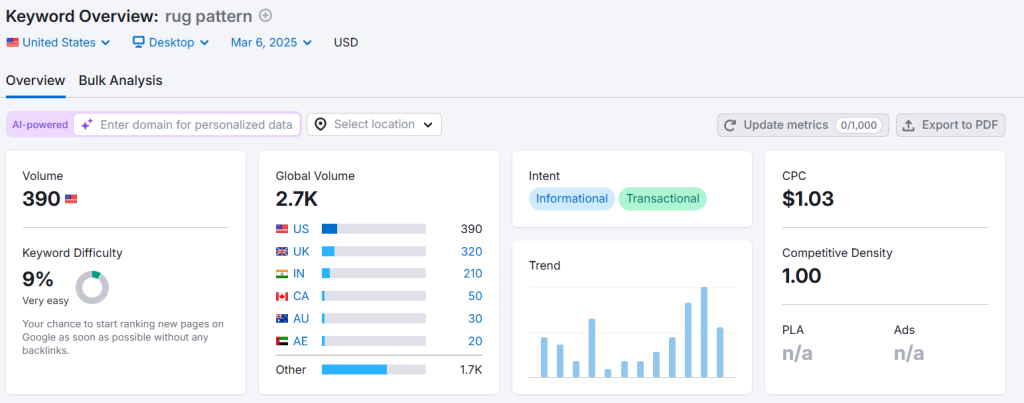
When it comes to improving website traffic, keywords are everything. Adding a specific keyword to a page tells Google that your page should rank for that keyword. Of course, this doesn’t mean you should target just any keyword. To start, you should target keywords that are relevant to your business.
Additionally, you should aim to target long-tail keywords—keywords that are a few words long. These keywords are more specific, meaning they target a more precise audience and have less competition in search results.
Keywords play a crucial role in improving website traffic. Therefore, it’s important to target the most relevant keywords and use keyword research tools like Semrush and Ahrefs.
If you’re not currently targeting any keywords, or if the keywords you’re targeting are not relevant or long-tail, it’s no surprise that you’re experiencing low traffic. However, you can start fixing this issue by rethinking your keyword strategy.
Another possible reason for your website’s traffic drop is that it might not be using HTTPS. Check your website’s URL—does it start with “https” or just “http”? If it’s the latter, this could be part of the problem. While the standard HTTP protocol is used by many sites, HTTPS is preferred.
The reason is that HTTPS is essentially a more secure version of HTTP. It tells users that your site is safe to visit—especially if it includes an online store where they might share financial information. Additionally, Google prefers HTTPS websites, so using this protocol can help you rank higher.
So far, we’ve looked at some things that could affect your website traffic in the long term. But what if this is a very recent issue? Maybe your traffic was fine last week, but it suddenly dropped significantly this week.
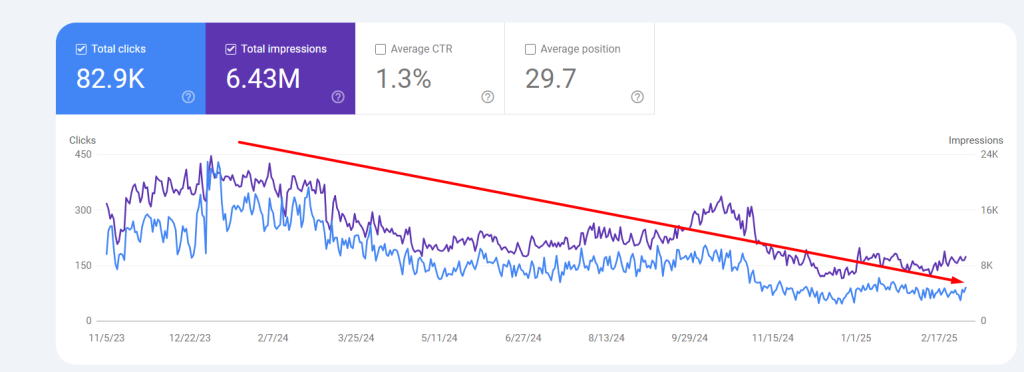
Before assuming something broke on your site, rule out the most common 2026 cause of a traffic drop that is not actually a ranking loss at all. Google now answers many informational queries directly inside an AI Overview at the top of the results, and a growing share of searches end without any click to a website. Your page can still rank exactly where it did last quarter and lose a third of its traffic, because the answer is now being read on the results page instead of on your site.
The tell is specific, and you can confirm it in Search Console in a few minutes. Look at the affected pages and check for a particular signature: impressions holding steady or even rising, average position flat, but click-through rate falling and clicks declining, most sharply on broad, educational, top-of-funnel pages. That combination, stable rankings with collapsing CTR on informational content, is the fingerprint of AI Overviews and zero-click search absorbing your traffic, not a technical fault or a penalty.
The fix is a shift in what you publish rather than a repair. Pages built to answer a question in one paragraph are the ones AI Overviews replace most easily, so the response is to move that content toward depth the overview cannot fully satisfy: original data, first-hand experience, comparisons, tools, and the kind of specific, decision-stage material that sends a reader to your site because the answer box could not finish the job for them. Traffic lost to zero-click on thin informational pages rarely comes back by tweaking the same thin page; it comes back by giving the searcher a reason to leave the results page.
In this case, it might just be a coincidence, but it could also be something more serious. Here are three possible reasons why your site traffic has dropped recently:
Take Advantage of Automation with Artificial Intelligence!
How can you use your time more efficiently? Artificial intelligence saves you time by automating repetitive tasks. Learn how you can leverage AI to accelerate your business processes.
One possible reason for your website’s lack of traffic could be that you recently made significant updates to your site. If you’ve made major changes to your site recently, this could affect your rankings on Google, leading to a drop in traffic.
For example, maybe you recently redesigned your site’s layout and launched the updated version. However, the redesigned website might load much slower than the original version, causing it to rank lower on Google. This could result in a significant drop in traffic.
If you’ve made major changes recently, review them to see if they might be responsible for the low traffic you’re experiencing.
Is Your E-Commerce Website Raking in Traffic but No Leads/Sales?
Get a Free Conversion Analysis Audit now!
Let's evaluate together how you can capture the attention of your target audience more effectively. The goal is to increase conversion rates ! Fill out the form now and get your free analysis report!
Google penalties occur when Google manually penalizes a website’s ranking position. This happens when websites use unethical, black-hat SEO tactics, such as:
Needless to say, you should avoid using any of these shady tactics. But what if you already have? You might have even done it accidentally. In that case, Google may have penalized your site, causing it to rank much lower (or not at all) and significantly harming your traffic.
Finally, the sudden drop in traffic might not be related to changes you made but rather to changes Google made. Google frequently updates its algorithm, sometimes making really significant changes. Check the news—has Google recently made a notable update to its algorithm?
If so, you need to understand exactly what those changes are. For example, let’s say Google rolled out an update focused on search intent. In that case, you should review your content and make some adjustments to better align with the search intent for the keywords you’re targeting.
Some traffic drops are not ranking problems at all; they are access problems. If search engines cannot crawl or index a page, it disappears from results entirely, and this often happens by accident after a site change, a plugin update, or a migration. Two settings cause most of these cases.
The first is the robots.txt file, which tells search engines how to crawl your site and which paths to include or exclude. A single misplaced disallow rule can block an important section of the site, and because the change is invisible on the page itself, teams often do not connect a traffic drop to it. Google Search Console surfaces this directly: in the Indexing report under Pages, the “Blocked by robots.txt” list shows exactly which URLs are being kept out. Editing robots.txt is easy to get wrong, so when an important page appears there unexpectedly, it is worth a careful review rather than a quick guess.
The second is the noindex tag, a small piece of HTML that instructs search engines not to index a page at all. A page carrying a noindex will not appear in Google even if your sitemap is submitted and everything else is correct, and these tags are frequently left behind by accident when a staging setting ships to production or a template change propagates site-wide. Search Console is again the fastest way to find them, flagging pages excluded by a noindex directive so you can remove the tag from anything that should be earning traffic.
A sharp, sustained traffic drop can also mean the site has been penalized. Google acts against sites that use manipulative, black-hat tactics, bought backlinks, keyword stuffing, cloaking, or duplicate content, and the effect on traffic can be severe and abrupt. There are two flavors worth telling apart, because they are diagnosed and fixed differently.
An algorithmic suppression happens quietly when something on the site trips one of Google’s anti-manipulation systems; there is no notification, and the traffic simply falls. A manual action is different: a human reviewer on Google’s webspam team has flagged the site, and this one you can confirm directly. In Search Console, the Manual Actions report shows any penalty Google has applied, along with the reason, whether that is unnatural links, thin or copied content, or a technical violation of the guidelines.
The recovery path depends on which you are facing. For a manual action, you fix every issue named in the report, then submit a reconsideration request through Search Console that explains plainly what went wrong, what you changed, and how you will prevent it recurring; transparency about the violation is what moves these requests forward. For an algorithmic suppression, there is no request to submit, so the work is to identify and remove the offending pattern, clean up the link profile or the content at fault, and wait for the next crawl and assessment cycle to restore the site. A quick way to check whether a site has been fully deindexed is to search site:yourdomain.com; if nothing returns, the site is not in the index at all, which points to a serious penalty or a site-wide indexing block rather than an ordinary ranking dip.
If a site was ranking steadily and then dropped suddenly across many queries at once, a Google algorithm update is a likely cause. Major updates, particularly core updates, can reshuffle results broadly, and a page that satisfied the old assessment can slip when the criteria shift underneath it. The broad, all-at-once nature of the drop is the signal that separates this from a page-specific technical fault.
The first step is simply to confirm the timing. Check whether Google announced or rolled out an update around the date your traffic changed, because aligning the drop with a known update tells you the cause is external rather than something you broke. When the two line up, part of the response is patience: results often keep moving for a week or two after a major update while the system settles, and reacting on day one can mean chasing noise.
Once things stabilize, the real work is understanding what the update rewarded and adjusting toward it. If an update emphasized helpful, experience-backed content, the response is to strengthen thin pages with genuine depth and first-hand expertise; if it emphasized a technical or security signal, the fix follows that. Staying aware of the direction each update takes is what lets a site recover from one drop and avoid the next, because sites that keep pace with the changes rarely take the full hit that sites running an unchanged, aging strategy do.
The fastest way to narrow down a traffic drop is to read its shape in Search Console before touching anything, because the pattern points at the cause. A few signatures recur often enough to be worth memorizing.
A drop where impressions hold but click-through rate falls on informational pages points at AI Overviews and zero-click search, not a technical fault. A drop that is sudden, broad, and hits many queries at once, lined up with a known update date, points at an algorithm update. A drop confined to specific pages that vanished entirely, rather than slipping a few positions, points at an indexing block or a penalty on those URLs. A gradual, long-running decline with no single break point usually points at accumulating technical debt or a strategy that has aged out rather than any single event.
Matching the shape to the cause first saves you from the common mistake of fixing the wrong thing. Rebuilding content to counter AI Overviews will do nothing for a site blocked by a stray noindex, and chasing a technical audit will not recover traffic that an algorithm update reassigned to a competitor with deeper content. Diagnose the pattern, then apply the matching fix from the sections that follow.
Improving website traffic isn’t always as simple as following the steps above. Sometimes, you may need to take it a step further by consulting with a professional SEO agency and working with an SEO service provider.
Fortunately, we’ve got your back. We offer professional SEO and digital marketing services to help your site rank higher and attract more traffic. With decades of experience under our belts, we know what it takes to drive traffic.
If you’d like to work with us as your SEO agency, contact us today to get started!

Join the
Digipeak Newsletter!
Stay up to date with the latest digital marketing insights, trends, and updates. Subscribe today!
Related Articles
Here is the fact that reorganizes everything else about mobile SEO: Google ranks your website …

The digital marketing industry is always moving. This constant motion demands adaptability and a deep …
Welcome to the future of data-driven marketing. We are a 360° Digital Marketing Agency. We …
An in-depth review of top-ranking articles in the USA and the UK reveals a news-oriented …


