

Custom Product Pages for ASO: Turn the Keywords You Rank For Into Installs
Most ASO work tries to move rankings, and rankings are getting harder to hold. App …


 ★★★★★ 5.0 · 100+ reviews








Table of Contents
MEET OUR TEAM!
Most AI music apps describe their technology when users are searching for an outcome. The store listing promises advanced AI music generation, while the person typing into the search bar wants a birthday song for their sister by tonight.
AI music app ASO is the work of closing that gap. It matches the words people type, the screenshots they scan and the proof they need before installing an app they have never heard of.
The category rewards that work more than most. Searches like “AI song generator” and “lyrics to song” only became common in the last few years. No app has a decade of install history protecting its rankings. Metadata, creative and conversion decisions still move positions here, which is rare in a mature store.
This playbook comes from doing that work. We run the ASO program for Melodize, an AI song generator. The steps below are the ones we used to build its keyword foundation on both stores. By the end you will have an intent map for AI music queries, a seven-step listing sequence and a way to measure whether it works.
AI music app ASO is the process of optimizing an AI song or music generator’s store listing, including its title, subtitle, keyword field, screenshots, preview video and ratings, so it ranks for the outcome-driven searches users type and turns those visits into installs on the App Store and Google Play.
Store search is still where installs start. Apple states that nearly 65% of App Store downloads happen directly after a search (Apple Ads). In a category with little brand recall, few people search for an AI music app by name. The listing that best matches the job wins.
In fitness or photo editing, head terms belong to apps with years of downloads and ratings behind them. Generative music is different: its query set is young and keeps moving as new uses appear, from lyric writing to occasion songs. A well-structured listing can claim terms here that would take years to win in an older category.
Nobody types the name of an audio model into the App Store. They type “make a song,” “song from lyrics” or “rap beat maker.” Apple’s search reads the app name, subtitle and keyword field. Google Play reads the full listing text (Apple Developer; Google Play Console Help). Both reward listings written in the user’s vocabulary, so the first ASO decision is a language decision.
An AI music app asks people to trust an output they cannot hear before installing. In this category, the product page is the demo. It has to show lyrics turning into a finished track and the range of genres. That puts creative on equal footing with copy, as you’ll see in the playbook below.
Before any metadata changes, every relevant query gets sorted into an intent family. Each family expects different proof and belongs in a different field, so the map decides what you write and where it goes.
| Intent family | Example queries | What the user needs to see | Best placement |
|---|---|---|---|
| Create a song | ai song generator, ai music maker, make a song | A finished song from a short prompt | App name, subtitle, Play title |
| Lyrics first | lyrics to song, song from lyrics, ai lyrics writer | Written lyrics turning into vocals | Subtitle, short description, first screenshot |
| Occasion | birthday song maker, love song for girlfriend, wedding song | A personal result with a name in it | Keyword field, custom product page |
| Genre and beat | rap beat maker, lofi music maker, instrumental generator | Genre choice and playable previews | Keyword field, full description |
| Voice and cover | ai voice cover, sing in someone’s voice | A rights-safe alternative | Avoid unless rights are clear |
The first four families are where an AI music app should compete. Create-a-song terms carry the most volume and competition. Lyrics-first and occasion terms carry clearer intent: someone searching “birthday song maker” has a deadline and a recipient.
Volume tells you how many people search; intent tells you how many of them install and stay.
With the families sorted, each one gets an owner field. That allocation was the first thing we built for Melodize.
Melodize is an AI song generator built by Applot. When the ASO program started, the app had no ranked keywords on Google Play at all. What follows is the foundation stage, the part most AI music apps skip because it produces spreadsheets before it produces rankings.
Take Advantage of Automation with Artificial Intelligence!
How can you use your time more efficiently? Artificial intelligence saves you time by automating repetitive tasks. Learn how you can leverage AI to accelerate your business processes.
We did not touch the listing until the keyword universe was complete, and for Melodize it ran across seven sheets. That structure stops metadata decisions from being made on search volume alone. Every term is judged on volume, difficulty and intent fit before it earns a field. A big term from the wrong family wastes a slot that a smaller, high-intent term would have converted.
Your Visuals Stand Out But You're Not Getting Any Feedback?
Get a Free Design Audit Now!
Let's evaluate together how you can better engage with your target audience visually, dysfunctional designs, and tips to increase engagement. Fill out the form now and get your free analysis report!
Apple gives you 100 characters in the keyword field, and every wasted character is a lost term. A validated string repeats no word from the app name or subtitle and uses commas without spaces. It favors singular forms unless the plural behaves differently. It also contains no competitor names or trademarks, which App Store Review Guideline 2.3.7 prohibits.
Melodize’s string passed that validation before submission, so the field carries only terms the name and subtitle do not already cover.
Google Play has no keyword field. Its algorithm reads the title, the short description and the full description, which turns the full description into the main ranking surface. We rewrote Melodize’s Play listing around the intent families. Core terms sit in the title and short description, then repeat in natural context across the full description, well inside Google Play’s metadata policy on repetition.
Melodize went from zero ranked keywords on Google Play to 21. Twenty-one keywords is a foundation, not a finish line, and we report it that way. It shows the store now understands what the app does. That is the precondition for every later gain, because you cannot climb for a term the algorithm has never linked to your app.
Many people research AI tools on the web, on video platforms and in AI assistants before they open a store. Melodize received a dedicated landing page at melodize.org and optimized YouTube metadata. The same vocabulary now appears wherever someone researches the category. Those pages give search engines and AI assistants a crawlable description that a store listing alone cannot.
In Digipeak’s mobile projects, the order of work matters as much as the work. Change the name, screenshots and description in one week and you cannot tell which change moved the numbers.
The App Store allows up to ten screenshots and up to three app previews of no more than 30 seconds each (Apple Developer). For AI music apps, the strongest first frame is a before-and-after: a few lines of lyrics on one side, a finished track on the other. Genre variety belongs in frames two and three; settings screens and pricing tiers belong nowhere near the start.
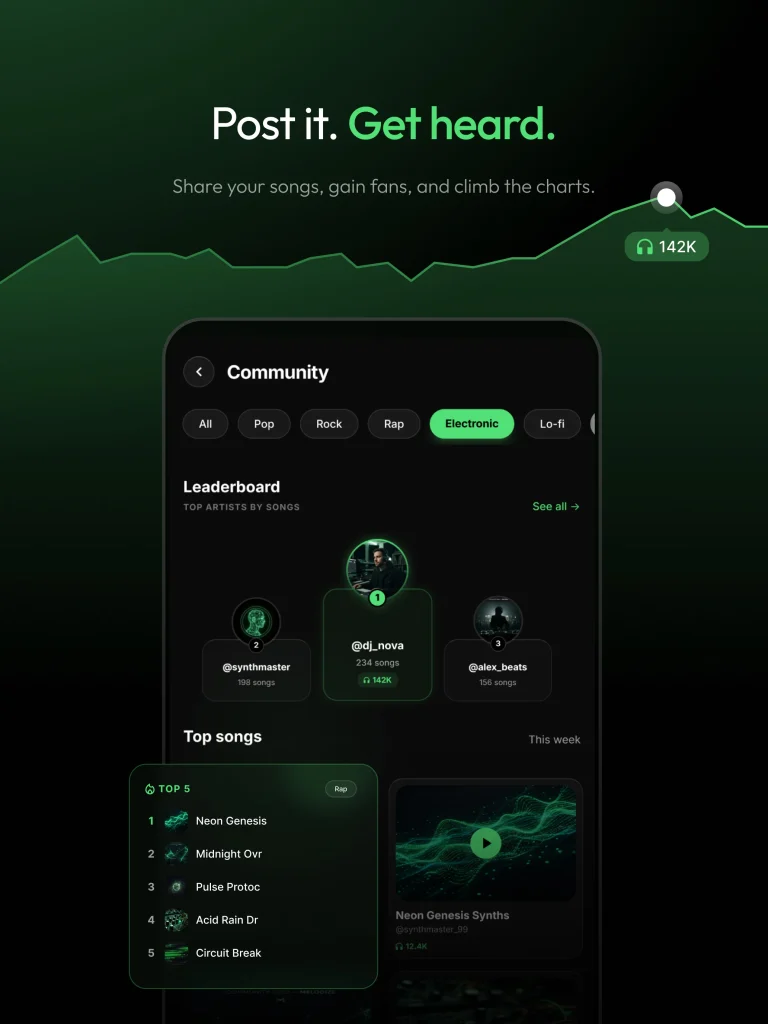
Step seven pays off fastest with occasion terms. Occasion searches respond well to a dedicated page with a birthday or wedding creative set. Our guide to custom product pages for ASO covers how to assign keywords to them on both stores.
Once the English listing is stable, the same intent map can be rebuilt market by market. The ASO localization guide explains which markets to take first. Occasion vocabulary in particular rarely survives direct translation, so each market needs its own research.
The intent map stays the same on both stores. The fields, limits and rules that carry it do not.
| Factor | App Store | Google Play |
|---|---|---|
| Text that affects search | App name, subtitle, keyword field | Title, short description, full description |
| Character limits | 30 / 30 / 100 | 30 / 80 / 4,000 |
| Text that does not rank | Promotional text (170 characters) | None; all listing text is read |
| Keyword-targeted pages | Custom product pages with assigned keywords | Custom store listings targeted by search keyword |
| Creative testing | Product page optimization, up to three treatments | Store listing experiments |
| Metadata cautions | No trademarks or other app names in keywords | No “best,” “#1,” “free” or ranking claims in title or icon |
A recent App Store change raises the stakes for clear copy. Apple now uses AI to generate tags from an app’s metadata and shows them in search. Developers can review the assigned tags in App Store Connect. If your copy never says lyrics, instrumental or beat, the model has little to tag. For the full two-platform framework, see our breakdown of App Store vs Google Play ASO.
Ranking gets an AI music app seen; trust gets it installed. Users hesitate over song quality, subscription cost and who owns what they create. Reviews answer the first; the listing must answer the other two.
| Ask for the Rating After the First Finished Song Apple limits the system rating prompt to three appearances per user in any 365-day period, so a badly timed prompt burns one of only three chances. The strongest moment is right after a user plays their first completed song, when the app has just proven its value. Prompting at launch, or straight after a paywall is dismissed, collects ratings from people who have not heard a result yet. |
State the trial length and free-tier limits in plain words, and say clearly whether users can use their songs commercially. If the paywall itself is leaking installs, the paywall stage of our mobile app funnel optimization guide shows how to find where.
Digipeak’s ASO audits of AI apps keep surfacing the same five problems. Each one is cheap to fix once you see it.
Measure ASO at three levels, and read them in this order, because each one explains the next.
Give every metadata change four to six weeks before judging it, and change one layer at a time so the data stays readable.
These are the questions we hear most often from teams launching or relaunching an AI music app.
There is no single best keyword; the best one is the strongest term from the intent family your app serves best. For most AI song generators that is a create-a-song phrase in the app name, a lyrics-to-song phrase in the subtitle and occasion terms in the keyword field. A smaller term with clear intent often brings better users than the highest-volume head term.
Indexing changes usually appear within days, but a reliable read on rankings and conversion takes four to six weeks per change. A full foundation, covering keyword research, metadata on both stores and a first creative test, typically spans two to three months. Young categories like AI music tend to move faster because fewer apps hold entrenched positions.
No. App Store Review Guideline 2.3.7 prohibits trademarked terms and other app names in metadata, and Google Play’s metadata policy restricts misleading references as well. Beyond the rejection risk, that traffic converts poorly because those users wanted a different app.
Screenshots affect rankings indirectly, through conversion. A higher tap-through and install rate from search tells the store your listing satisfies the query, which supports your position over time. Some practitioners report that the App Store now reads screenshot captions. Apple has not confirmed it, so write captions for users first.
ASO can carry an AI music app on its own in the early stage, because store search is where most installs start. Paid App Store search becomes useful once the listing converts well, since paid traffic lands on the same page. Ads on a weak listing only raise cost per install.
Three findings carry this playbook. AI music is one of the few app categories young enough for metadata work to move rankings quickly. Users search for outcomes, so the listing must use their words and prove the output on the first screen. And the foundation, a keyword universe plus validated fields on both stores, comes before any creative test or paid push.
Tomorrow, export your search terms from both consoles, sort them into the intent families above and check whether your first three screenshots show a finished song. That afternoon of work usually reveals the biggest gap.
Looking ahead, app search is moving toward systems that read your listing for you: store tags generated from metadata and assistants that recommend apps in conversation. Listings written in clear outcome language will be read correctly by those systems as well as by people.
Digipeak treats ASO as the first growth channel for a new app, not a one-time metadata task. Every engagement starts the way Melodize did: a full keyword universe, intent mapping and validated fields for both stores. Creative and paid spend come after, so later decisions rest on data.
From there, our mobile team runs the stages in sequence: store-specific metadata, creative testing, keyword-targeted pages, localization and the off-store layer. Reporting tracks keyword footprint, search conversion and install quality, so you see which change produced which result.
With offices in London, Istanbul and Texas and 100+ clients, we add paid acquisition and retention work when the app is ready. To see where your AI music app stands, you can book a 15-minute call with our mobile team and we will walk through your listing together.

Join the
Digipeak Newsletter!
Stay up to date with the latest digital marketing insights, trends, and updates. Subscribe today!
Related Articles
Most ASO work tries to move rankings, and rankings are getting harder to hold. App …

The most expensive mistake in subscription app growth is killing a channel on day one. …
There is a brutal piece of math behind every paid user acquisition budget. Teams that …
The most expensive mistake in mobile app funnel optimization is fixing the wrong stage. A …


