
AI Music App ASO: How to Rank an AI Song Generator
Most AI music apps describe their technology when users are searching for an outcome. The …


 ★★★★★ 5.0 · 100+ reviews








Table of Contents
MEET OUR TEAM!
Most ASO work tries to move rankings, and rankings are getting harder to hold. App Store search can reshuffle without warning, and sponsored results now take more of the screen above organic listings. That makes the next search position slower and more expensive to win than it was a year ago.
There is a faster lever, and both stores now support it. Apple lets you assign keywords to custom product pages so they appear in organic search, and Google Play lets you target custom store listings by search keyword. In both cases, a shopper who searches a specific phrase can see a product page built for exactly that phrase instead of your generic default page.
This guide treats keyword-targeted product pages as what they are: a conversion play on searches you already rank for. It covers what changed on each store, how to pick the right keywords, how to build a page that matches the query, the setup steps for Apple and Google Play, and how to measure whether it worked.
A keyword-targeted product page is an alternate version of your store listing that the store shows to people searching a keyword you have assigned to it. The app, the reviews, and the download button stay the same. What changes is the presentation: the screenshots, the promotional text or description, and on Google Play even the app name and icon.
On the App Store, custom product pages began as a paid-traffic tool tied to Apple Ads and unique URLs. Apple’s developer documentation now states that you can assign keywords to your custom product pages so they appear in search results for those keywords, rather than your default product page. Apple asks that each keyword match the intent of the page and that each keyword combination belong to a single page.
On Google Play, custom store listings can target users in specific countries, pre-registered users, inactive users, and users who search for specific keywords. You can create up to 50 of them. Play Console also suggests keywords that already bring you traffic and, per Google’s store listing overview, can draft a tailored listing for those searches with Gemini.
Together, these features change what a keyword is worth. A keyword used to earn you a position. Now it also earns you a page.
Most ASO tactics need weeks of indexing and ranking movement before they pay off. Keyword-targeted pages skip that step, because they only apply to searches where your app already appears.
You already rank; you are under-converting. Every app has keywords where it shows up in results but loses the tap to a competitor whose screenshots speak more directly to the query. A meditation app ranking for “sleep sounds” shows the same mindfulness screenshots to that searcher as to everyone else. A page built around sleep converts the traffic you already have.
Search is still the main entrance. Apple has long reported that almost 65 percent of App Store downloads happen directly after a search. Improving conversion on search results is improving conversion on the biggest share of your installs.
Conversion is the part you control. Ranking algorithms change without notice, and paid placements compete for the same screen. Your tap-through and install rate on a given query is the one variable you can move this week, with assets you already know how to make.
It compounds with ranking signals. Both stores reward listings that convert the searchers they are shown to. Better conversion on a keyword is therefore not only more installs today; it is a stronger relevance signal for that keyword over time.
The practical question, then, is which keywords deserve their own page. The answer comes from your own search data, not from a keyword tool.
Start in your store dashboards. App Store Connect and Play Console both show which search terms bring impressions and installs, and Play Console surfaces suggested keywords when you set up keyword targeting.
On the App Store, one extra constraint applies. The keywords you assign to a custom product page are drawn from the keywords already in your app’s metadata, so keyword research for your main listing still comes first. A strong app store optimization foundation is what gives targeted pages something to work with.
A targeted page succeeds or fails in the search results themselves. Apple notes that the elements of a product page shown in search include the app name, subtitle, and screenshots. On a phone, that usually means the first few screenshots are all a searcher sees before deciding to tap.
Lead with the searched intent. The first screenshot should answer the query in plain words and a clear visual. If the search was “budget tracker,” the first frame shows a budget, not your app’s onboarding.
Echo the searcher’s language. Caption text on screenshots should use the same words people searched. It reassures them they landed in the right place, and it keeps the page consistent with the intent you assigned.
Keep the brand recognizable. Change the message, not the identity. Colors, typography, and app icon (on the App Store) stay consistent, so the page does not look like a different app.
Order the rest by objection. After the hook, use the remaining screenshots to answer what a searcher with that intent will wonder next: price, privacy, setup time, or how it compares to a free alternative.
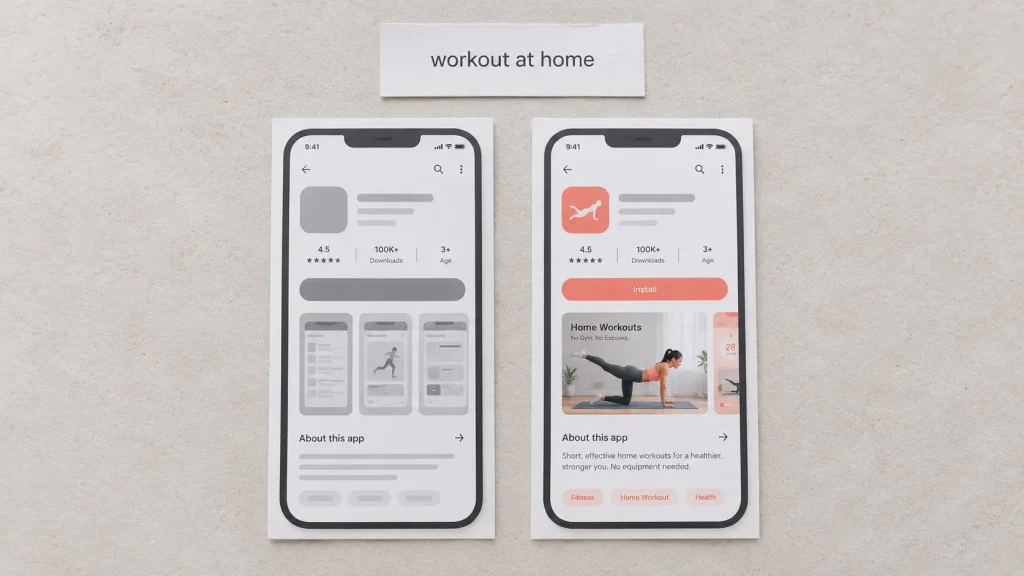
In App Store Connect, create a custom product page from your app’s product page settings, then add the screenshots, app previews, and promotional text for that page. Apple’s custom product pages documentation describes how each page can also carry a deep link, so a tap from that search can open the app on the most relevant screen after install.
Next, assign keywords to the page. Choose only keywords that match the page’s intent, and make sure each keyword combination is unique to one page, as Apple’s search guidance requires. Submit the page for review; it can only appear in search once it is approved and live.
Expect some limits. Keyword-targeted pages depend on your app actually ranking for the assigned keyword, and paid placements can still appear above organic results. Treat the setup as a conversion test, not a ranking change.
In Play Console, go to Grow users, then Store presence, then Custom store listings, and create a new listing. Under targeting, choose search keywords, then pick from the keywords Google already shows as bringing you traffic, or search for new ones.
Google Play lets a custom listing differ more than Apple does, including the app name, icon, descriptions, and graphic assets. Use that freedom carefully: a changed name or icon can confuse returning users. Also note Google’s warning that custom store listings do not include automated translations, so each one needs its own localized text where you serve multiple languages.
The two stores solve the same problem with different rules. The comparison below is the quickest way to plan for both.
| Feature | Apple App Store | Google Play |
|---|---|---|
| Name of the feature | Custom product pages with assigned keywords | Custom store listings targeted by search keyword |
| Where keywords come from | Keywords already in your app metadata | Play-suggested keywords or ones you search for |
| What can change | Screenshots, previews, promotional text, deep link | Name, icon, descriptions, graphics |
| Page limit | Several dozen per app (check current limit) | Up to 50 custom listings |
| Key rule | Each keyword combination on one page only | No automated translations per listing |
Before launch, record impressions, product page views, and installs for the assigned keywords over the previous two to four weeks. After launch, compare the same window. App Store Connect reports custom product page performance separately, and Play Console reports performance per custom store listing.
Judge each page on conversion rate, not install count. A page that converts better may still show fewer installs in a week where impressions dipped because of a ranking swing. Conversion rate isolates the effect of the page from the movement of the algorithm.
If a page underperforms the default, change one thing at a time, starting with the first screenshot. If it clearly outperforms, look for the next intent group in your search terms and repeat. Paid search data can speed this up: testing a page against a keyword in Apple Search Ads before assigning it organically shows conversion quickly at controlled cost.
Once the first pages have a result, the work becomes a loop: find an intent the default page underserves, build for it, test, and keep what wins.
These questions come up as soon as teams start assigning keywords. The direct answer leads each one, followed by the detail that matters in practice.
Yes. Apple now lets you assign keywords to custom product pages, and a page with assigned keywords can appear in search results for those keywords instead of your default product page.
The page must be approved and live, and your app still needs to rank for the keyword for the page to appear.
Take Advantage of Automation with Artificial Intelligence!
How can you use your time more efficiently? Artificial intelligence saves you time by automating repetitive tasks. Learn how you can leverage AI to accelerate your business processes.
Not directly. They change which page is shown for a search you already appear in, so their first effect is on conversion.
Over time, better conversion on a keyword can strengthen your relevance for it, but the reliable, immediate gain is more installs from the same impressions.
Your Visuals Stand Out But You're Not Getting Any Feedback?
Get a Free Design Audit Now!
Let's evaluate together how you can better engage with your target audience visually, dysfunctional designs, and tips to increase engagement. Fill out the form now and get your free analysis report!
Start with two or three, one for each clear search intent your default page underserves.
Each page needs its own creative and its own measurement, so a few well-built pages produce clearer learning than many thin ones.
Both show a tailored listing to people searching specific keywords. Apple pages change screenshots, previews, and promotional text, and draw keywords from your existing metadata.
Google Play listings can also change the app name and icon, allow up to 50 listings, and let you pick from keywords Google already sees bringing you traffic.
Once the page is approved and live, impressions on the assigned keywords start using it right away.
Allow two to four weeks of data before comparing conversion with your baseline, longer for lower-volume keywords.
Recent store changes have made rankings less predictable and search screens more crowded. Keyword-targeted product pages work with that reality rather than against it. They do not ask the algorithm for a better position; they make the position you already hold convert better.
The workflow is short. Pull your search terms, find the keywords where you rank but under-convert, group them by intent, and build one page for each group with a first screenshot that answers the query. Test against paid search where you can, assign the winners organically, and measure conversion rate against a baseline.
For apps serving several markets, the same pages can carry localized versions, which connects this work to a wider ASO localization plan. And because Apple and Google Play implement the idea differently, it helps to plan both together with the platform differences in mind, as covered in our App Store vs Google Play ASO comparison.
Digipeak starts from the search terms report, not from a creative brief. Each engagement maps the keywords where an app already ranks, scores them by impressions and conversion, and groups them into intents the default page underserves.
From there the team builds a small set of targeted pages, tests them against their keywords with paid search, and assigns only the winners organically on the App Store, mirroring the setup on Google Play where the app is available. Results are read on conversion rate against a pre-launch baseline, so ranking swings do not distort the verdict.
The work sits inside Digipeak’s wider ASO services, run from London, Istanbul, and Texas alongside paid user acquisition and app growth programs.
If your app ranks for keywords it is not converting, ask Digipeak for a keyword-to-page review and see which searches deserve their own product page first.

Join the
Digipeak Newsletter!
Stay up to date with the latest digital marketing insights, trends, and updates. Subscribe today!
Related Articles
Most AI music apps describe their technology when users are searching for an outcome. The …

The most expensive mistake in subscription app growth is killing a channel on day one. …
There is a brutal piece of math behind every paid user acquisition budget. Teams that …
The most expensive mistake in mobile app funnel optimization is fixing the wrong stage. A …


